 Connected Business Community
Let's Connect
Connected Business Community
Let's Connect
Create Customer Refunds
Overview
In an event that you give back the customer his payment for a disputed transaction or items he returned, you may use the Customer Refund option to take this into account.
Create Customer Refund
Steps
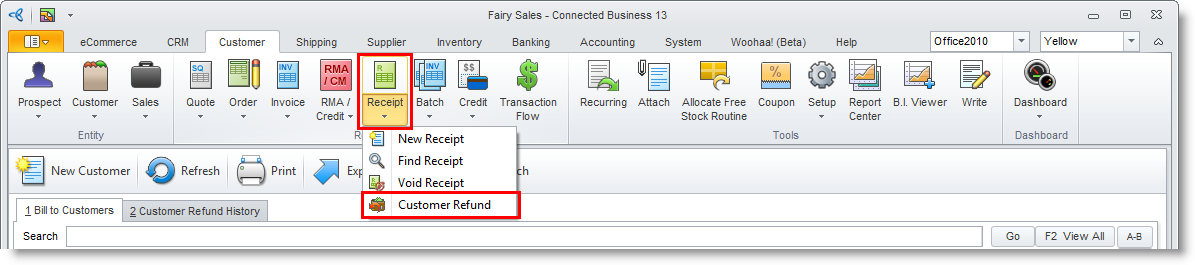
- From the Customer module, select Receipt > Customer Refund. A search list of customers will display.
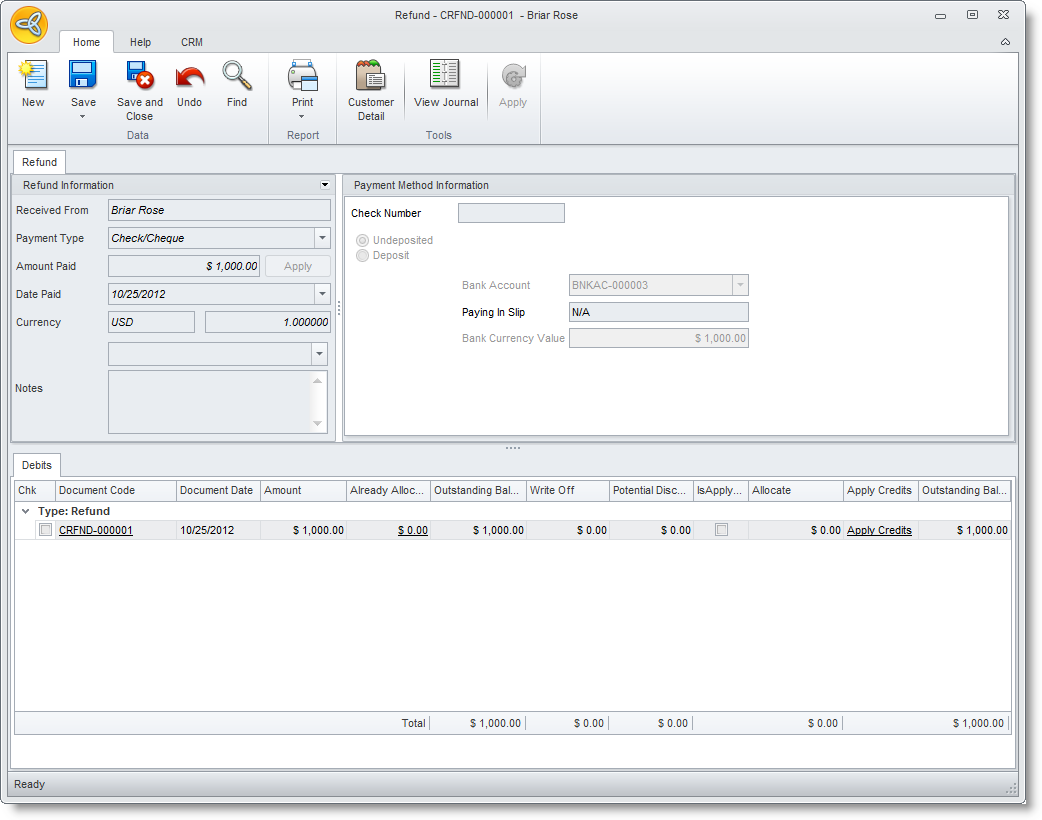
- Select the customer from the list to display the Refund form. Notice that the customer refund is similar to the Customer Receipt form.
- Enter the refund information such as date and amount paid in the Refund tab.
- You may create a refund through the same payment methods: through Check, Credit Card or Cash.

It is important to note the following for creating a refund for a credit card payment.
Select Credit Card in the Payment Method pulldown. The fields for the credit card information would appear in the Refund Information section.
You may select the customer credit card from your file or enter the Credit Card Number and other credit card information (and save into file).
After entering the necessary details, click on the Credit button. This option will attempt to process a chargeback for the customer credit card and return the funds to his credit card account. Make sure that there is an active gateway assigned to the credit card payment type.
