
Supplier Profile
You can find your supplier account information in your Woohaa Profile. This is where you can add or update details in your account, publish/unpublish your company cover image, and even set preferred payments and drop ship fees for your transactions.
Once your enrollment is approved, you can start updating your account information. If you are not enrolled yet, refer to Woohaa! Supplier Enrollment.
View Supplier Profile
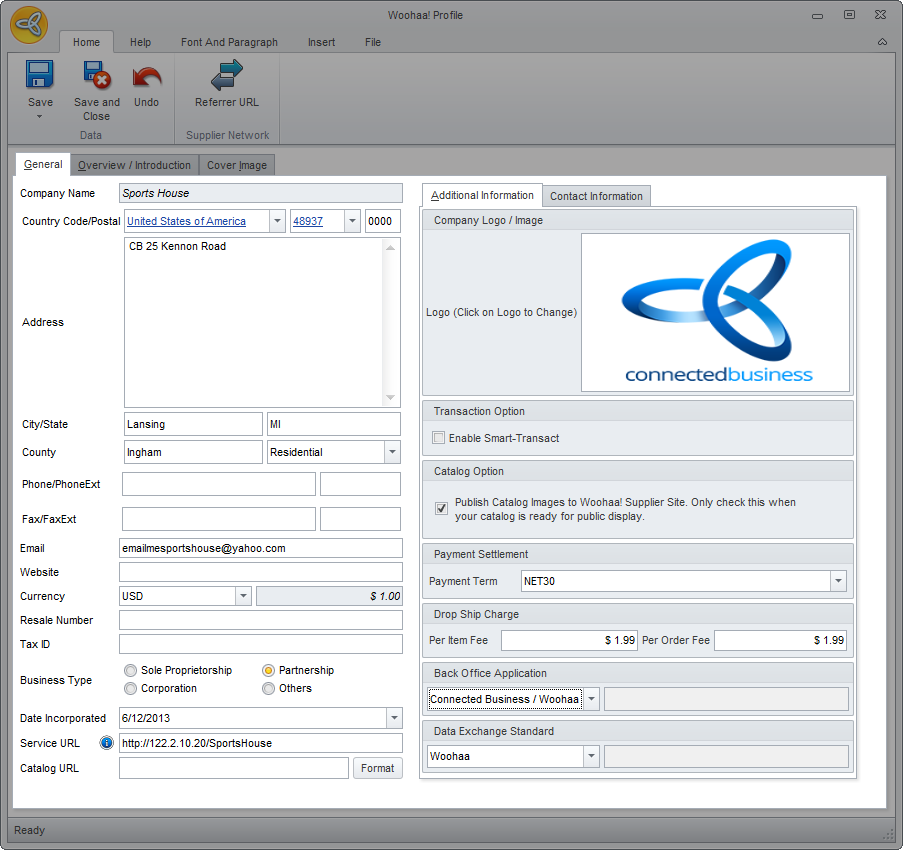
To access your Woohaa! profile, go to Woohaa! module ► Setup ► My Profile. The Woohaa! Profile form will be displayed.
Click Image to Enlarge
The following are the tabs and fields found in the Woohaa Profile form and its corresponding functions and description.
- General Information - This section shows the information provided during the enrollment process in the Woohaa Network. This is also where you can add more information and set additional options for your Woohaa transactions. Aside from the basic company information, you can also indicate the details for the following:
Field Description Service URL The client service used by Woohaa! to connect with your server for updates and automation. This is an optional service and you can proceed with the enrollment process without this. However, this service is required if you want to use the full automated functionality of Woohaa!.
If you do not have a service URL set up yet, refer to Woohaa! Service URL.Catalog URL A listing of your products which your retailers can browse online. It may be a Woohaa! bundled catalog or an existing non-Woohaa product catalog. Format Click this button if you want to format your CBE website to be used as a catalog website. This is only applicable for CBE website. ADDITIONAL INFORMATION Enable Smart-Transact If enabled, the Woohaa system will automatically reprocess all failed Woohaa transactions (PO and Invoices) for a specified increasing time interval unless the process is cancelled by the user. Catalog Option Tick this option if you want to display or publish your cover image in the Woohaa! Supplier Dashboard. Payment Term The preferred payment term of the supplier which is shown in the supplier information of the Woohaa! Supplier Dashboard and is visible to all retailers. Back Office Application The back end application used by the supplier for connecting to Woohaa! e.g. Connected Business Data Exchange Standard The data exchange format used for communicating with the Woohaa! server. Default format is Woohaa. CONTACT INFORMATION This is where you can add pertinent details for your company’s contact in Woohaa!.
- Overview / Introduction - This is where you can write a brief description or any informative statement about your company and its operations. The overview can include key facts about your company that your customers may find essential and pertinent.
- Cover Image - This is where you can set your supplier cover image. To add an image, just double-click on the image preview field or right-click on the field then select Load.Your cover image can be your company logo, a promotional ad, catalog image or any image that represents your company. The cover image must be 1080px (w) by 1398px(h). Images with sizes other than the required size will be auto resized. it is recommended to crop your image according to the required size prior to uploading as resizing may affect the quality and appearance of the image.

Your cover image will not be visible in the Woohaa! Supplier Dashboard unless the option to publish your cover image is enabled in your supplier profile.