
Set Up Recurring Schedule for Sales Orders
You can set up recurring schedules from the Customer Module.
To do so,
- On the Customer Module click Recurring. The Recurring Transactions list will be displayed.

Click Image to Enlarge
- Select one transaction from the list to show the Recurring Transaction form.
- In the following window that will be shown, provide the details for this recurring product:
- Start by providing the Description for this recurring product.
- Then select the Interval by which this order will be shipped (Daily, Weekly, Monthly, or Yearly).
- Clicking any of those intervals generates a set of fields. Provide the necessary details for this.
- Lastly enter the Effectivity Range for this recurring order on the set of fields provided at the bottom. Then click OK.
- You may also include complimentary documents for this order by supplying the necessary information for this in the Details section.
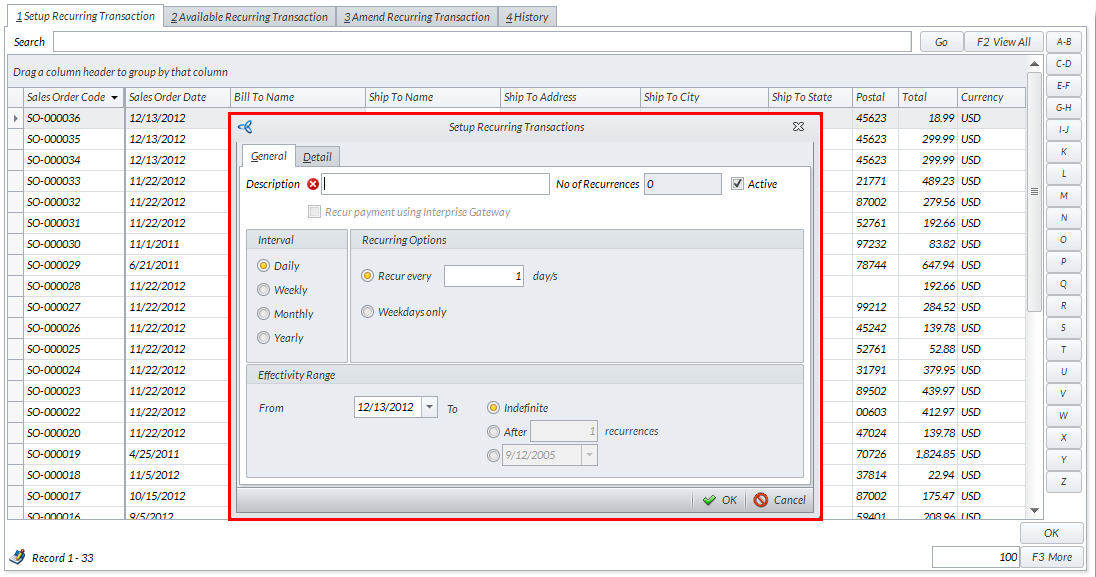
Click Image to Enlarge
- Start by providing the Description for this recurring product.
- From the Amend Recurring Transactions tab, select amendable transactions by double-clicking items inside the list.
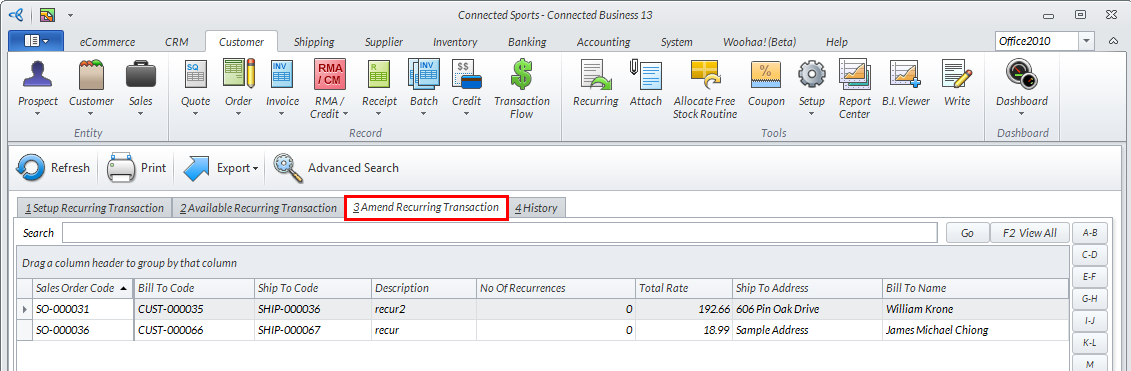
Click Image to Enlarge
Amended transactions will be available for processing from the Available Recurring Transactions tab.

For more related information, please see the Set a Recur Schedule for the Bank Payment/Receipt online documentation.