
Woohaa! Retailer Enrollment
For you to use the full functionality of Woohaa!, you need to enroll and be approved as a Woohaa Retailer. Once approved, you can subscribe and download products online from all Woohaa! suppliers sell products, and expand your inventory without having the actual stocks in your warehouse.

All applications for enrollment are sent to the Woohaa! admin for review and approval.
Before you can enroll to the Woohaa! Network, you need to have the following applications set up first:
- Connected Business Application
- Woohaa! Service URL
This is optional; however, this is useful if you want to automate the processing of Woohaa! transactions. See Woohaa! Service URL.
Enroll for a Woohaa! Retailer Account
The steps below demonstrates how to enroll for a Woohaa! Retailer account.
- Open the Connected Business application. Go to System module ►Woohaa! Enrollment menu. The Woohaa! Enrollment Wizard will be displayed. Alternately, you can also go to www.woohaa.com to enroll.
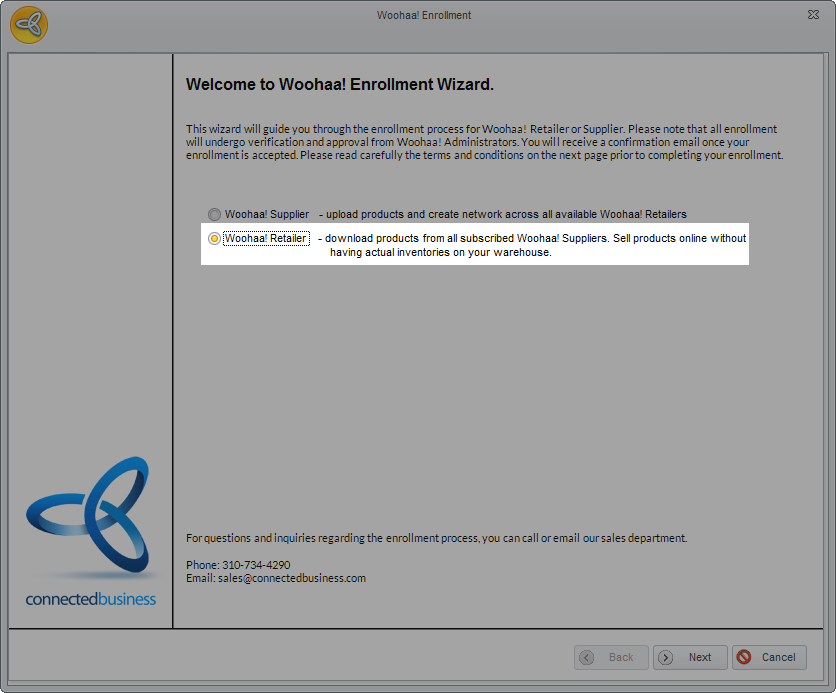
- Select Woohaa! Retailer for the enrollment account type and click Next to proceed.
Click Image to Enlarge
- In the Terms and Conditions page, read carefully the terms and conditions for the enrollment. If you agree and accept the terms, tick the checkbox right next to the “I accept the Terms in the License Agreement” and click Next to proceed.
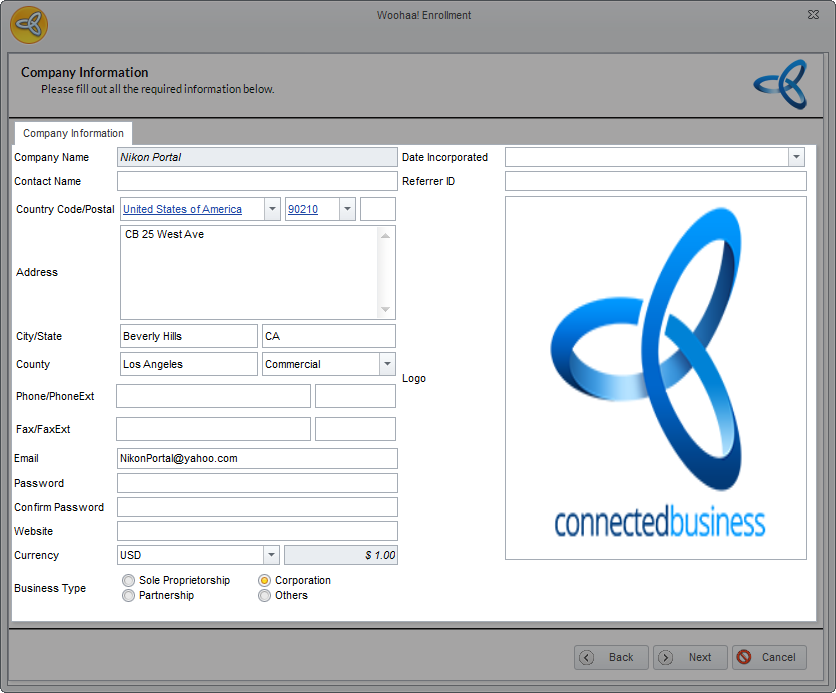
- In the Company Information page, enter all the details required for the enrollment.
Click Image to Enlarge
The following table shows the fields found in the Company information tab.
Field Description Company Name The name of the company to be enrolled in Woohaa!. Contact Name The person that represents the company in the Woohaa! network. Country / Postal The country and postal code of the company. Address The exact location, street, block, etc. where the company can be found. City / State The city and state where the company is located. County / Address Type The country and address type (residential or commercial) of the company. Phone / Phone Ext. The company’s telephone and extension number (if any). Fax / Fax Ext. The company’s fax and extension number (if any). Email The email address where the Woohaa! enrollment confirmation and approval will be sent .This is a required field. This will also serve your access for logging in to Woohaa! Web Console (Merchant Page) Password The password used in accessing your Woohaa! account online.. Confirm Password Website The official website of the company enrolled in Woohaa! . Currency / Exchange Rate The default currency of the company and the current exchange rate for the selected currency. Business Type The company ownership type. Date Incorporated The date your company was established. Referrer ID Also known as Private Network ID. A Private Network is a network created to isolate retailers from suppliers in the Woohaa! public network. This type of network is useful for suppliers who want to retain their existing retailers. The PN ID is given by suppliers to selected retailers they want to include in their private network. Suppliers can make a request to set up a private network and retailers can opt to join a private network. The referrer ID can be an ID or a complete URL provided by the sales team or the supplier. The system will automatically parse the ID. To set up a private network, refer to Woohaa! Private Network. Company Logo Select an image or logo to represent your company in the Woohaa! Network. Double-click on the image preview field to upload your company logo. Once uploaded, your company logo will be visible in your supplier profile.
- After entering all the details for enrollment, click Next and Finish to close the enrollment wizard. A prompt message will be displayed confirming that your enrollment is successfully submitted for review and approval.
- Once reviewed, you will receive an email confirming the status of your enrollment.