
Show/Hide the Tab Page
|
Content
|
|---|
Learn how to customize the tab page by following the steps below:
HIDE THE TAB PAGE
- To hide the tab page, select the tab and click on the Customize button. Select Hide Item to hide the tab page for this user role.
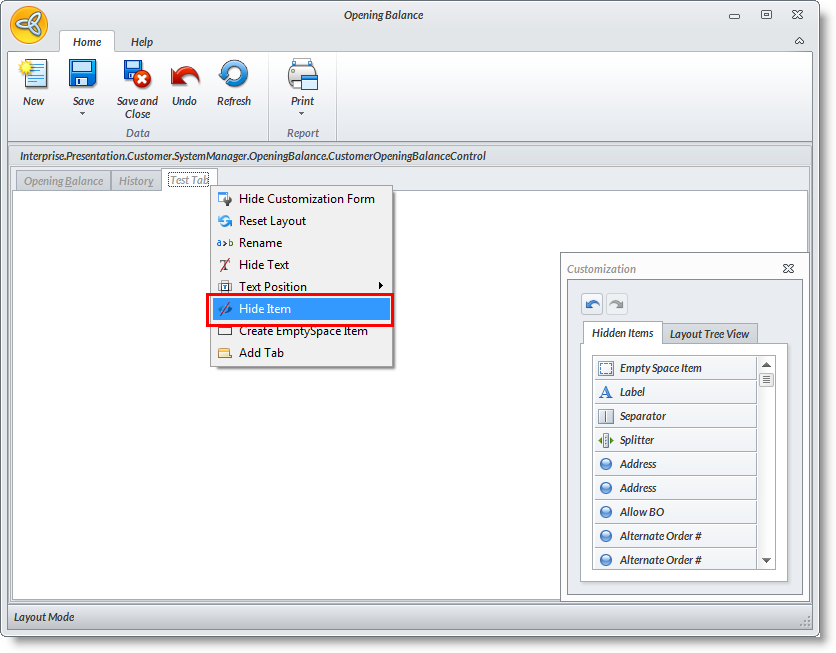

VIEW OPTIONS TO CUSTOMIZE THE TAB PAGE
-
From the User Role maintenance form, select the module from the Selected Modules List. Right click on the module and select Edit Module. The module will be displayed in "Layout Mode".
-
Load the form to modify e.g. select Coupon under the Setup menu to display the Coupon detail form. You will find Customize buttons from every section in the form.
-
To customize the tab page, select the tab page from the row of tabs e.g. click on the Products tab.
-
Right Click on the Customize Layout button to view the options.
Related Links
- Tuesday, 11 December 2012
- Posted in: Customize Tab Page