
Modify Existing Table Properties
Learn how to modify existing table properties by following these steps:
Steps
- Go to the System Manager module.
- Select Customize > Data Dictionary button from the menu. The Data Dictionary form will display.
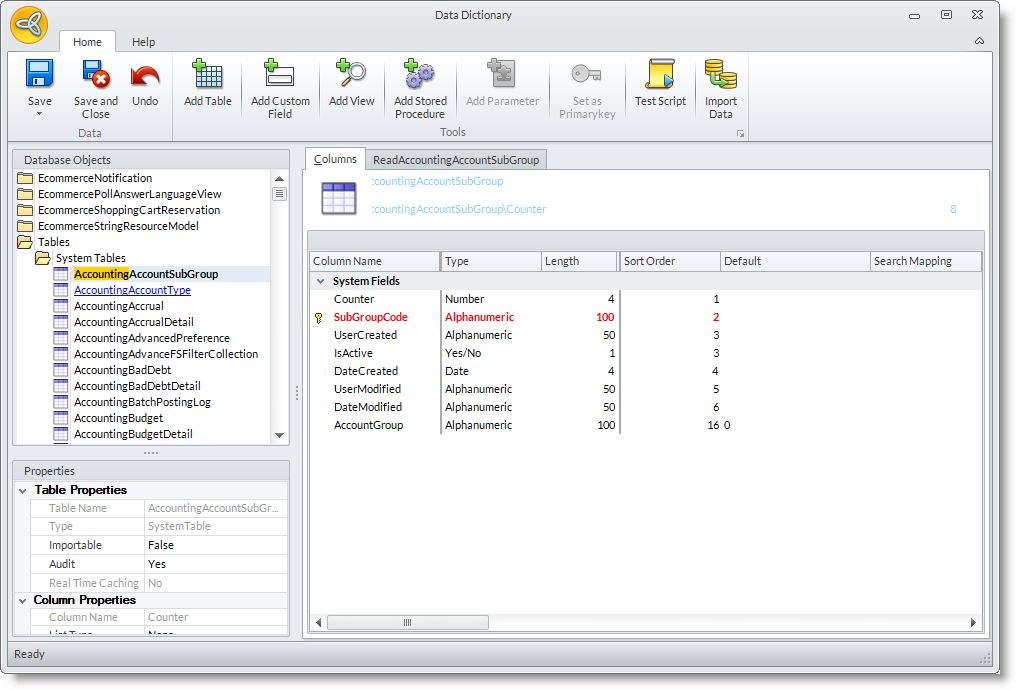
- The Database Objects List on the left lists all tables, views and stored procedures (from your existing system views and tables as well as custom views and tables created in the data dictionary).
- To modify an existing table property,
- Select the table in the Data Dictionary Objects list. The views are arranged in an alphabetical manner so you can search for the view by typing in the first few letters of the view name from the System Table folder.
- In the Properties pane, modify the properties of the selected table.

- Select the table in the Data Dictionary Objects list. The views are arranged in an alphabetical manner so you can search for the view by typing in the first few letters of the view name from the System Table folder.
|
Field |
Description |
| TABLE PROPERTIES | |
| Table Name | Indicates the name of the table. Read-only value(cannot be modified). |
| Type | Indicates what type of table property does it belong. Read-only value(cannot be modified). |
| Importable |
Use this property to enable importing records into this table in the Connected Business. Select Yes if you want to import records. Otherwise, select No. The default value is Yes. |
| Audit | You may specify the value to Yes if the table can be audited. Otherwise, you may set it to No. |
| Real Time Caching | Indicates the real time caching of the records. Read-only value(cannot be modified). |
| COLUMN PROPERTIES | |
| Column Name | Indicates the name of the column. |
| List Type |
Specify what type of list should it appear on the forms. Options are:
|
| Auto Create Table | Select from the list of available tables if you want to automatically attached a table views. |
| MULTILINGUAL PROPERTIES | |
| Language Code | Select from the list of available languages to which the specific table view can be applied. |
| Display Label | Specify the column name of the table. You may change the column name when needed. |
| Bubble Help | Specify the description or the details of the column name. |
