
Manual Gateway Control
The Manual Gateway is a special gateway that you can use to process payments from your website without charging the customer or call to any live gateway. Use this gateway if you want to – test your site end to end before going live, process customer payments offline, or charge the customer through a back-end processing solution.
Set Up Manual Gateway in Connected Business
- Open the Connected Business application.
- Go to Banking > Setup and select the Credit Card Gateway option. The list of supported credit card gateways will be displayed.
- Select Manual from the list and the gateway details will be displayed. Check the Allow Sale option.
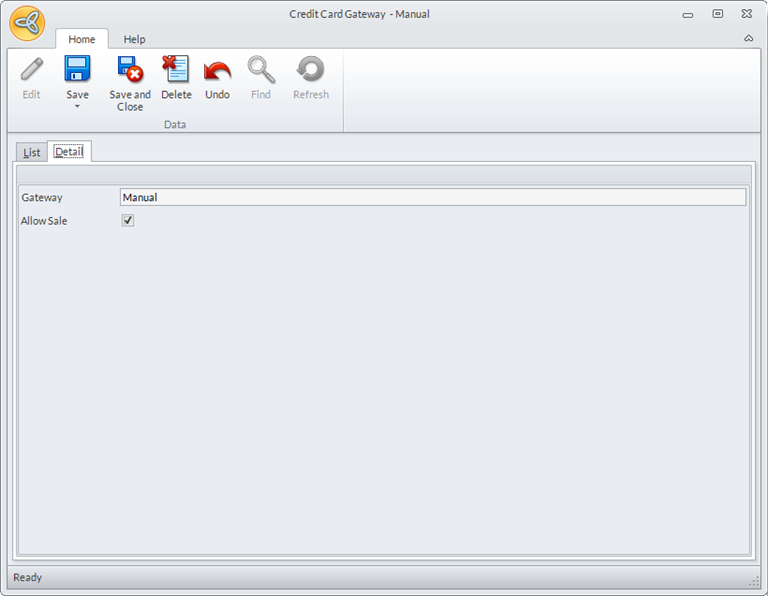
Click Image to Enlarge
Click Save and Close to save your settings. - After setting the configurations for Manual Gateway, set it as the payment gateway for the website. Go to eCommerce module > Webstore and the list of existing webstores will be displayed.
- Select the webstore where you want to use the gateway and the webstore details will be displayed.
- In the Merchant Login field, select Manual from the dropdown list.
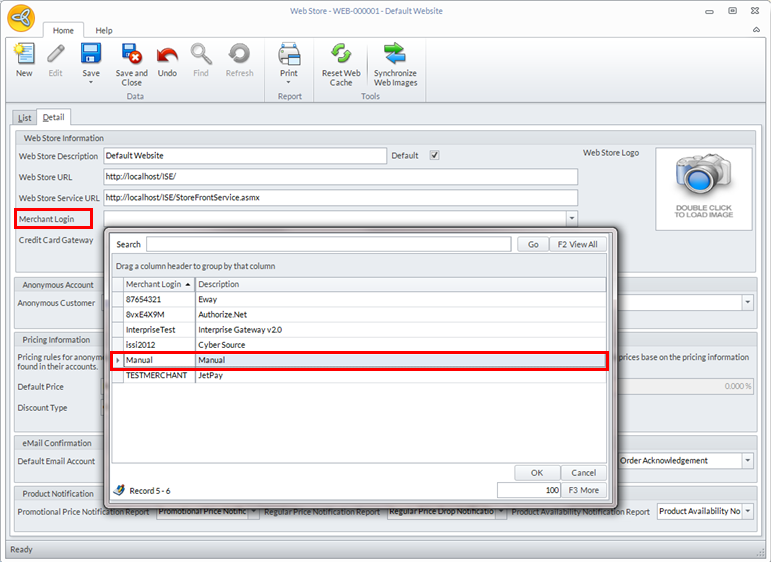
Click Image to Enlarge
- Click Save and Close to save your settings.