
Closed Period Journal
Overview
The Prior Period Adjustment menu allows you to create an adjusting journal entry for the closed period.
Steps
- From the Accounting module, select Period > Prior Period Adjustment. A search screen of previous closed period adjustments is displayed.

- Click New icon from the menu of the search screen. The Adjustment Entries form will be displayed.
- Set the fields for the Detail section.
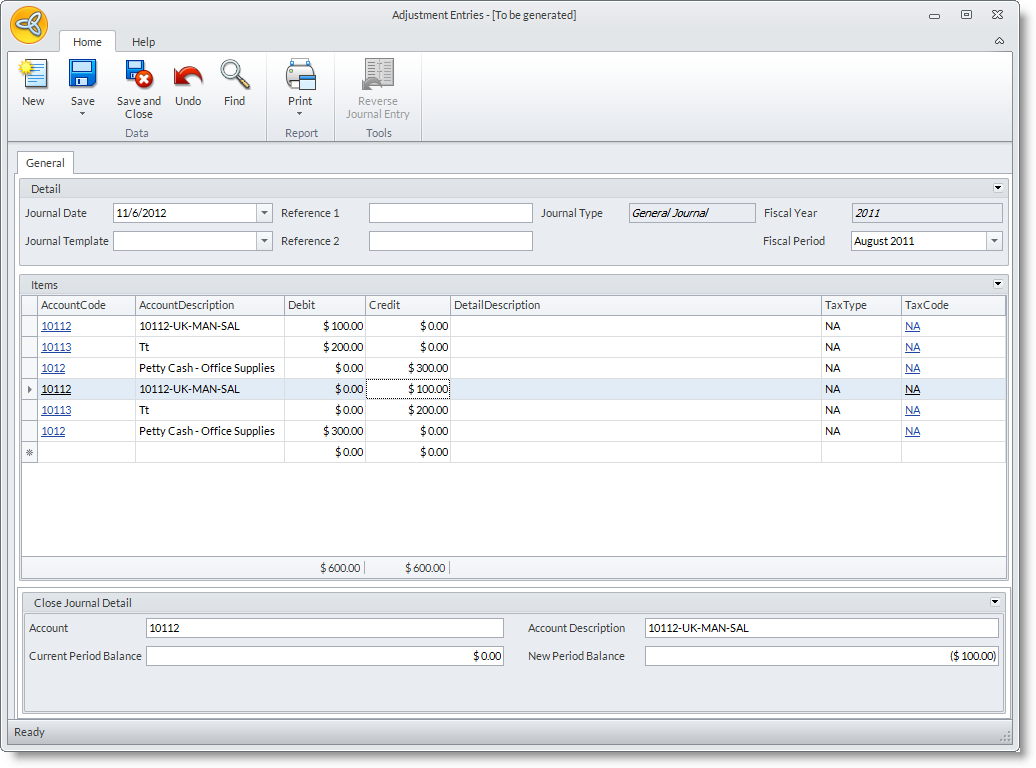
Here are the descriptions of its fields:
- Journal Date - The date of the last fiscal year.
- Journal Template - The template of the journal to be applied (optional).
- Reference 1 - Denotes the related records that the journal is based on.
- Reference 2 - Denotes the entity that initiated the journal.
- Journal Type - The type of the journal.
- Fiscal Year - The fiscal year of the journal to be processed; by default, the last fiscal year.
- Fiscal Period - The fiscal period of the journal to be processed.
- Set the account codes to be included in the journal in the Items grid. You can view the current and new brought forward balance of the accounts on the Prior Year Adjustment Detail section at the bottom.
- Save the form to create a posted adjusting journal entry.
